

Uninterruptible Power Supply for Whole House: Worth It?
What should still be running when the grid drops: the refrigerator and furnace blower, or every outlet in the house?
That answer sets the whole design. A whole-house UPS earns its price when it carries a defined set of loads through short and medium outages, and it becomes expensive dead weight when it is asked to feed a panel that was never sorted. Outages are ordinary enough that planning matters: many households lose power completely at least once in a year, and even a few hours can decide food safety, basement water, heat, and work calls.
Choose in this order: list the loads that must stay on, note which ones surge at startup, check panel capacity and any EV charger demand, then set a runtime target. Battery systems respond instantly and stay quiet for shorter events; long multi-day events push the decision toward fuel and service capacity. A charger can equal several household circuits, so it belongs in the load plan before hardware, not after the quote.
Use that order as the checklist, and the setup is chosen before the product.
Table of Contents
Which Backup Option Fits Your Home
Four configurations cover nearly every house, and each one answers the same three questions: how fast power comes back, how long it lasts, and which loads it can carry. Put them side by side and the trade-offs stop being abstract.
Backup option | Switchover time | Typical runtime | Best use |
|---|---|---|---|
Whole-house battery system (UPS-style) | Milliseconds to under 1 second | Hours, set by usable kWh | Electronics and essential circuits |
Managed battery with load shedding | Under 1 second | Set by usable kWh and load size | Refrigerator, sump pump, heating controls |
Standby generator | About 10 seconds | Days, while fuel lasts | Extended outages and heavy loads |
Portable UPS for electronics | Milliseconds | Minutes to a few hours | Computers, modems, routers |
Read the rows left to right and the logic surfaces. Switchover time decides what notices the outage at all: a router, a desktop, or a furnace control board never reboots on the first two rows, while everything on a generator circuit restarts, which is why you hear the clock on the microwave reset. Runtime decides how long the quiet lasts, and on a battery that number comes from usable kilowatt-hours divided by the load you left connected, not from a sticker on the box. Scope decides the bill, because carrying a whole panel means buying an inverter and battery sized for motor starts you may never run simultaneously.
The practical rule: match the row to the load, not the load to the row. A house that needs its network rack up for four hours and its furnace blower up for two days needs two different answers.
A ten-minute test you can run tonight, before any sales conversation:
The 10-minute list. Devices you cannot lose for ten minutes without real damage or disruption. Usually the modem, router, home office setup, medical equipment, and the sump pump in a storm.
The 8-hour list. Refrigeration, heating controls, a few lights, phone charging, security system.
The 3-day list. Whatever you'd relocate for. Most families discover this list is short, and that a generator or a planned overnight elsewhere beats a battery big enough to cover it.
Three lists, three different answers. That's the whole decision framework in miniature.
How Often Whole-House Outages Really Happen
Backup planning starts as an arithmetic problem, and the first number in that math is frequency. In the 2023 American Housing Survey, roughly 33.9 million U.S. households, about 1 in 4 nationwide, reported being completely without electricity at least once during the preceding 12 months, according to the Department of Energy's summary of the survey findings.
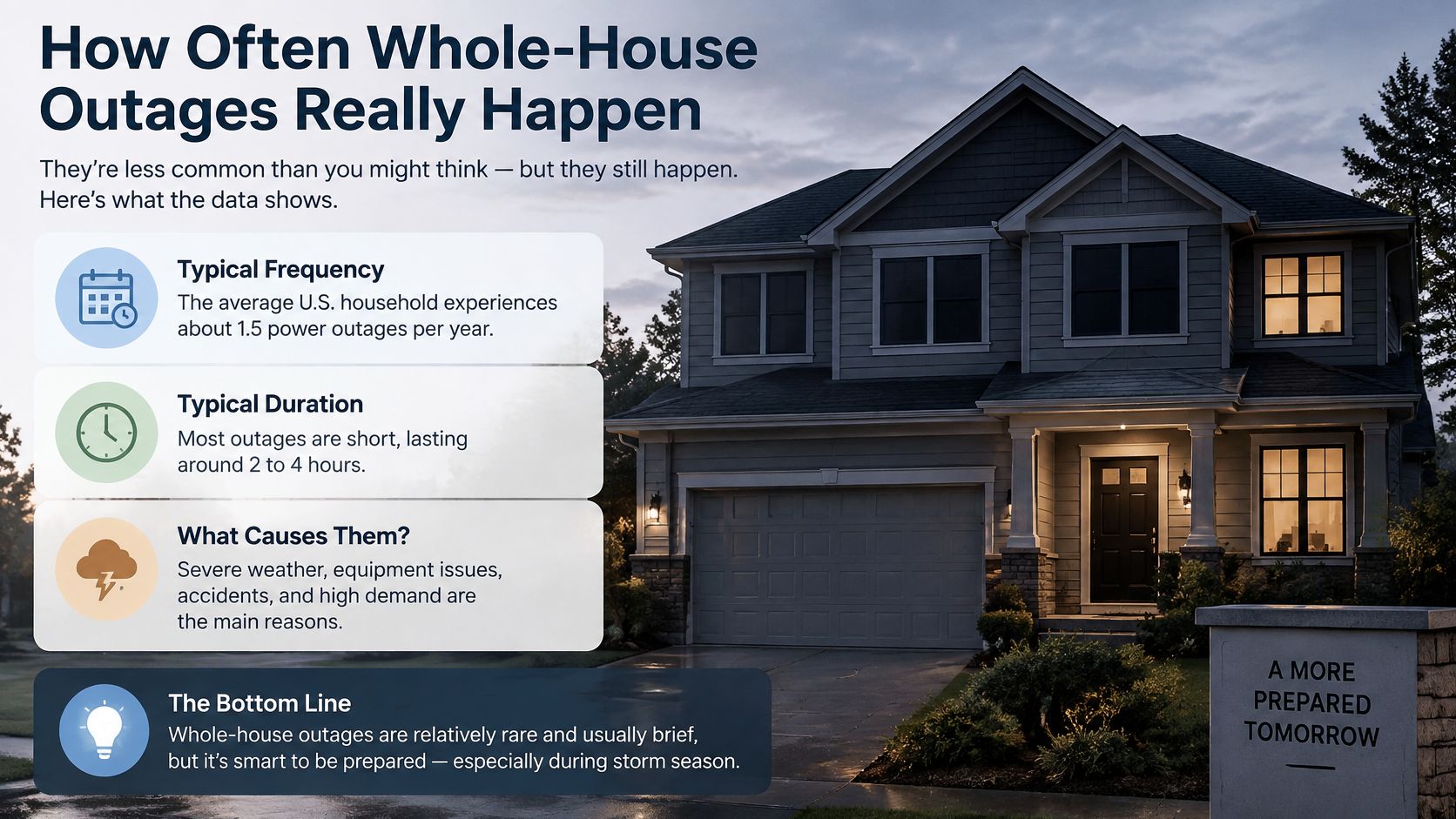
That one-in-four figure is not a rare event. It works like weather math: a modest annual probability, repeated every year you own the house, with the cost landing on your refrigerator, your basement, and your paycheck each time it hits. The rest of the survey fills in the shape of a typical event:
Roughly 70% of households that reported an outage, or 23.6 million homes, said at least one interruption lasted six hours or longer.
Homeowners reported outages at 28.3%, compared with 19.9% among renters, and rural households at 35.4% against 22.8% of urban households.
About 2.4 million housing units reported that someone missed work because of an outage, and roughly 2.9 million households, or 8.4% of those surveyed, said someone had to stay away from home overnight.
Six hours is the threshold that changes the conversation. Past that mark, food in a refrigerator sits in the danger zone, a sump pump in a wet basement stops being optional, and a medically dependent family member needs a plan that doesn't involve a car charger and a prayer. The missed-work and overnight-stay figures describe the same pattern: an outage long enough to disrupt a day, not just a dinner.
Location shifts the odds too. The rural-urban gap matters in Southeastern Pennsylvania, where a property at the end of a long rural feed sits in a different reliability category than one three blocks from a borough substation. Same storm, different exposure.
Once the frequency and duration numbers are on the table, the planning question sharpens. The design question is which loads need uninterrupted continuity and for how many hours. Refrigeration, medical equipment, communications, heating controls, networking gear, and security systems each carry a runtime target, and the six-hour mark gives those targets a floor to work from.
How a UPS Differs From Batteries and Generators
A UPS, a battery system, and a standby generator do three different jobs on the same power path, and the order decides what your home experiences. The UPS is a bridge that carries the load across the gap the instant the grid drops. The battery holds essential circuits for the hours its usable capacity allows. The generator arrives after the gap has already opened and takes over for the long haul.
That ordering is why transfer behavior decides whether a refrigerator compressor or a desktop computer ever notices the outage.
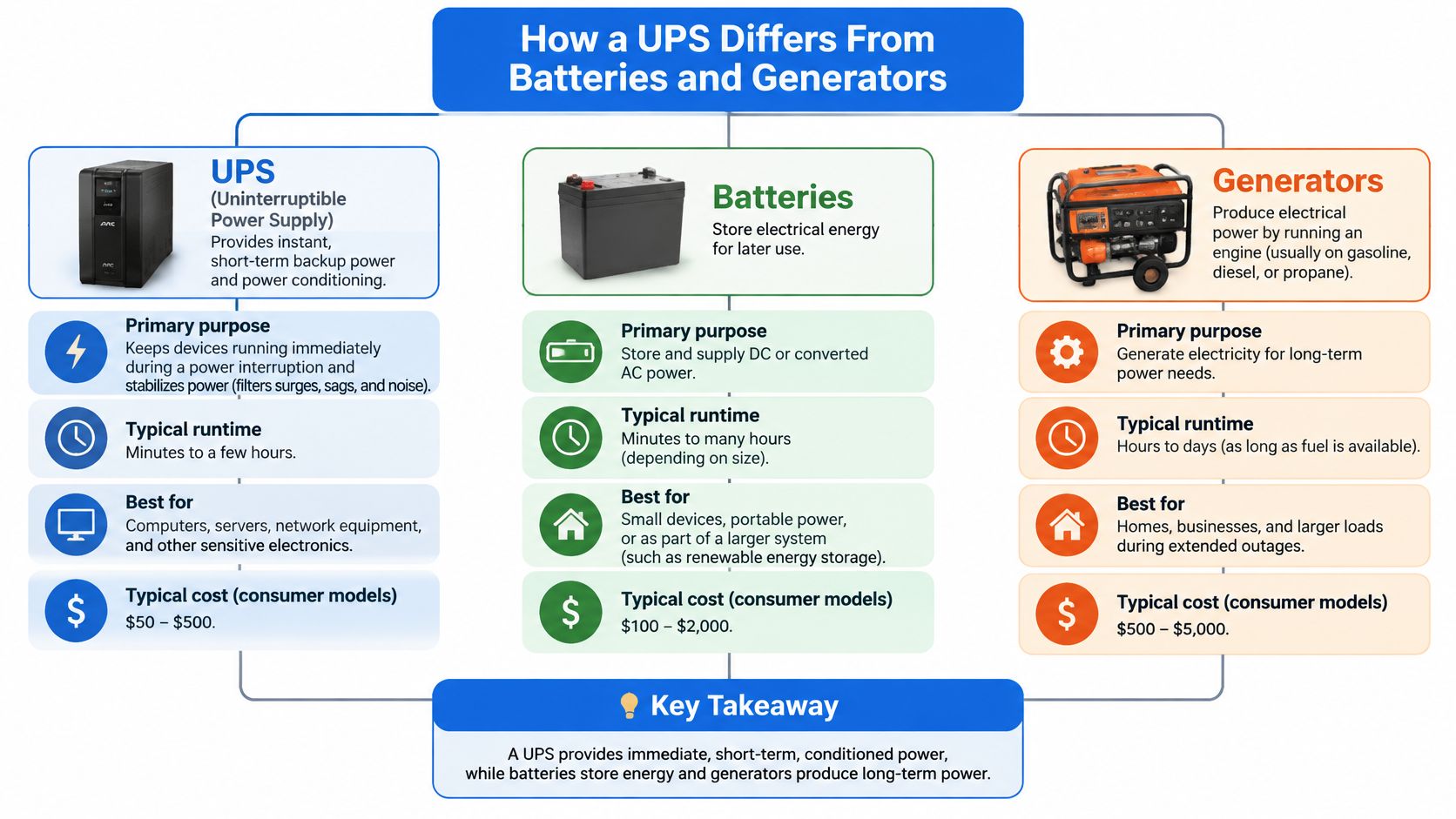
Step one, the bridge. Electronics with switching power supplies tolerate almost nothing. The first role exists purely to make the outage invisible to them.
Step two, the reserve. A battery or managed system holds essential circuits for the hours its usable capacity allows, and load shedding stretches that window by dropping the water heater and the EV charger first. Solar panels are optional here. A battery charges from ordinary utility service and discharges when the grid drops.
Step three, the long haul. A generator takes over for multi-day events, but only after its engine stabilizes and the transfer switch closes. Anything sensitive that stays online through that handoff is riding the battery's stored energy while the generator spins up.
The economics explain the attention. Lawrence Berkeley National Laboratory estimated that sustained U.S. power interruptions, which the IEEE convention defines as lasting more than five minutes, already cost electricity customers tens of billions of dollars a year, and the toll has grown since. Oak Ridge National Laboratory's analysis of outage costs reports major outages rising from 4,666 in 2018 to 6,533 in 2024, a 29% increase, with the average major outage stretching from 9.6 hours to 11.8 hours and the estimated annual customer cost reaching $121 billion in 2024.
Five minutes is the dividing line. A UPS erases the flicker, a generator answers the afternoon, and the battery holds everything in between. If you're still weighing one against the other, this comparison of battery backup versus a generator walks through the same trade-offs from the equipment side.
Sizing Loads by Running Power and Surge
A well pump that starts while the fridge is already running asks the inverter for a short spike well above the watts you see on a quiet afternoon. That spike is the number that gets skipped, and it is the one that knocks a backup system offline.
Three quantities sit under every sizing question.
Kilowatts (kW) work like the flow rate through a hose: the instantaneous rate the inverter has to deliver right now. Kilowatt-hours (kWh) work like the tank behind that hose. Stored energy sets how long the flow can continue. Surge is the splash when a motor kicks on, a brief multiple of running power that lasts a second or two at start.
A battery that holds lights and a router can still trip the moment a well pump starts. The start test is the one that fails systems that looked fine on running watts alone.
The three numbers that decide sizing
Add the running watts of every load you intend to keep. Then add the largest surge among motor loads that could start while everything else is already on. Surge decides whether an inverter holds, so size for it rather than average draw. A kWh figure by itself does not tell you whether a compressor will start, how heating and cooling fit, or how long the outage lasts. For a short outage, keeping every circuit on a full panel is often more capacity than the outage calls for.
Load | Typical running power | Starting surge | Backup priority |
|---|---|---|---|
Refrigerator | 150 to 250 W | About 3x running at compressor start | High |
Sump pump (1/2 hp) | 600 to 800 W | 2,000 to 2,500 W | High in wet areas |
Well pump (1/2 hp) | 700 to 1,000 W | 2,000 to 2,500 W | High if on well water |
Furnace blower | 300 to 600 W | 2x to 3x running | High in winter |
Heat pump (3-ton) | 3,000 to 4,500 W | Compressor start adds roughly 2x for seconds | Medium, size for compressor start |
Electric water heater | 4,500 W | No motor surge | Low, can be shed |
Level 2 EV charger at 32 A | 7.7 kW | No surge | Low, exclude during outages |
Central air conditioning (3-ton) | 3,500 W | Up to 2x at compressor start | Low to medium, seasonal |
Treat those as planning ranges and confirm each against the nameplate or owner's manual before you commit to a size. A fridge full of food and a 15-year-old well pump do not behave like the catalog average.
Use the priority column as the decision rule before you pick equipment. Keep the high-priority rows: refrigeration, a sump pump where water is a risk, a well pump if that is your water, and the furnace blower in winter. Give the heat pump and central air a compressor-start allowance, then decide whether that season's comfort load stays on the backup list. Shed the water heater. Leave the Level 2 charger off during the outage. At 32 A and 240 V it draws about 7.7 kW of running power with no surge at all, so it spends storage without helping the house stay livable.
Sizing rule: size the inverter for the worst realistic combination of running load plus the single largest motor start, then size the battery for the hours you need at that average draw.
Build the load list in three steps
List every candidate load with its running watts and its surge, straight off the nameplate. Medical equipment, network gear, and the sump pump go on the list even if they seem small.
Mark the must-run circuits and give each a runtime target: ten minutes, eight hours, or three days. Anything without a target gets dropped from the backup panel.
Total them for a 24-hour outage and compare that number with the kWh figure in the quote. If the math does not reach your target, shed loads rather than buying capacity.
Scenario comparisons make the point faster than any formula. Refrigerator plus internet lands in the 300 to 500 W range and runs for many hours on modest storage. Add a sump pump and the surge jumps into the thousands. Add a heat pump and you are sizing for a compressor start that dwarfs everything else on the list. The whole-home row is a different budget entirely. A structured electrical load assessment is how that arithmetic gets done properly rather than guessed.
Panel Limits and EV Charging Come First
A 32-amp, 240-volt Level 2 charger draws about 7.7 kW, and that one load can consume most of a typical home battery's continuous output by itself. Plug in overnight, lose power at 2 a.m., and the battery drains before sunrise doing the one job you'd happily have skipped.
The bottleneck is usually the service itself. Stack a heat pump, electric water heater, well pump, range, and a Level 2 charger on a 100-amp or 200-amp service and you get a peak the backup system can energize but cannot carry continuously, a constraint the EIA's electricity reliability FAQ frames in terms of matching design to actual local risk rather than a generic runtime promise.
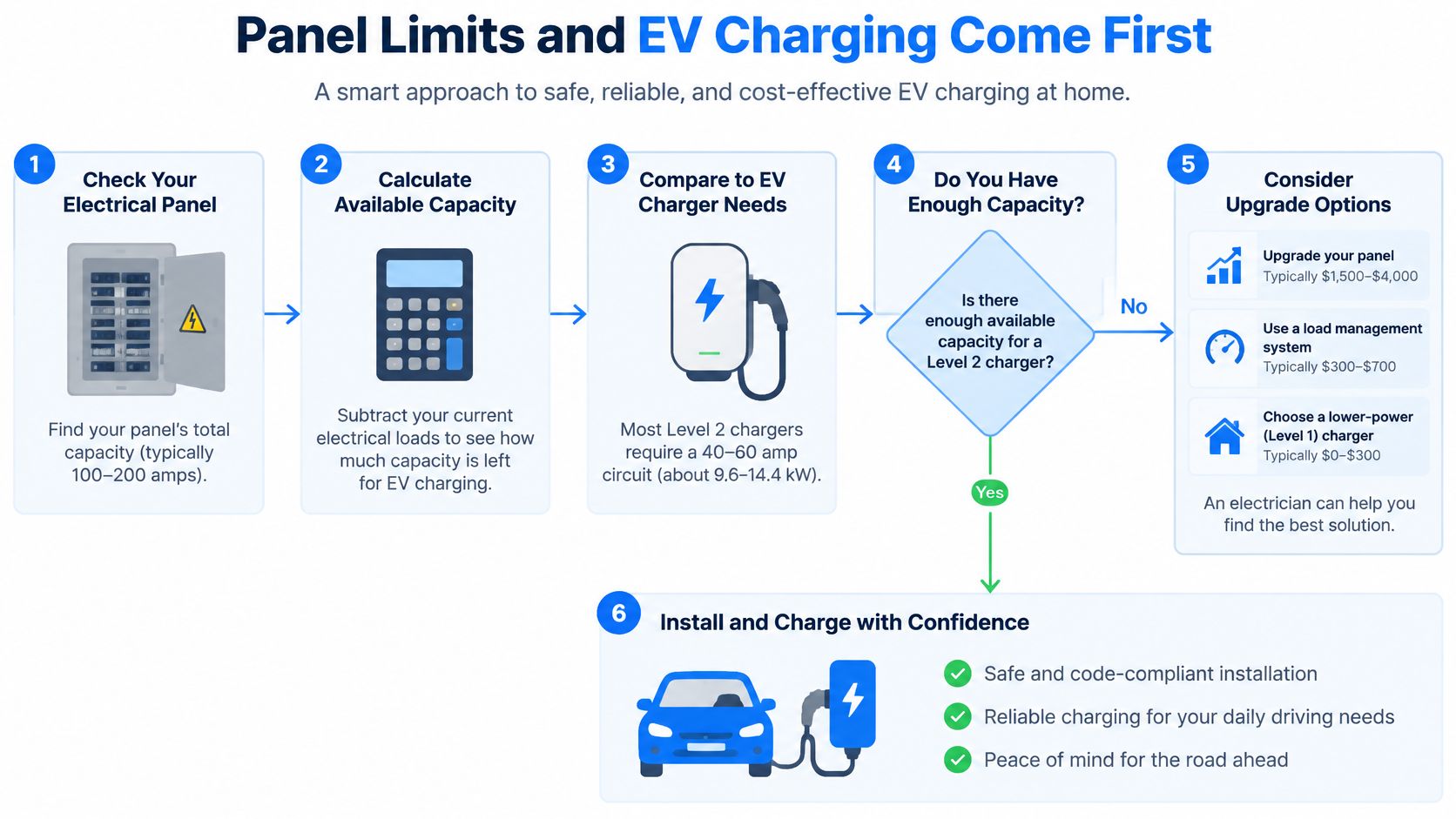
Work through it in this order:
Have the panel and service assessed so you know the continuous capacity before anyone quotes equipment.
Decide between a panel upgrade and a full service replacement. Amp'd assesses the current setup and lays out both paths.
Set the EV charger to pause on battery backup or to run only in a scheduled window, so charging never competes with the loads that have to stay on.
Choose which circuits transfer. A selective backup panel costs less and holds up longer than an oversized battery feeding circuits nobody needs during an outage.
Selective circuits, automatic load shedding, a charging schedule, and a service upgrade often buy more resilience per dollar than an extra battery module. Panel work also has to satisfy local electrical codes before any transfer equipment goes in, and Amp'd's licensed electricians handle residential service upgrades at 200 or 400 amp, so the assessment comes before the shopping. Sometimes a home electrical panel upgrade is the cheapest resilience you can buy.
Matching Backup Setups to Common Home Situations
A backup spec sheet becomes clear only after the house has been reduced to a list: which circuits must stay live, how long they need to run, what the panel can feed, and whether an EV charger has to wait.
Common situation | Settle this first | Setup implication |
|---|---|---|
No solar panels, battery still wanted | Whether the battery can charge from utility service | Stored backup stays viable without solar, as long as grid charging and runtime targets line up |
Well pump, sump pump, or compressor with a hard start | Starting surge compared with inverter output | Pick by the start first, then by how long the load must run |
EV added now or likely later | Spare capacity and a charging priority rule | Give the car a lower place in line than refrigeration, water, controls, and heat |
Runtime need beyond stored energy | Fuel access, refill plan, and acceptable noise | A generator or hybrid carries the tail that stored energy should not be sized to cover |
The useful question is usually “what has to stay alive,” not “which box is biggest.” A battery can cover the immediate gap and carry quiet loads cleanly, while a generator makes sense when the limiting factor is fuel logistics rather than stored capacity. Homes without solar can still use battery backup through utility service, and homes planning solar, storage, equipment, or additions should leave electrical room for that later work.
Choose the product after you have named your essential loads and runtime targets.
For a combined setup, ask how the pieces behave together: whether the battery can recharge while the generator runs, which loads are locked out automatically, and how the system hands the house back to normal grid power.
What Whole-House Backup Costs Depend On
Price differences between two quotes for the same house almost always trace back to six drivers, and only one of them is the battery.
Usable kWh sets how many hours your essential circuits run after the sun goes down and the grid stays out.
kW rating and surge capacity decide whether a well pump or heat pump compressor will start, not just whether the lights come on.
Panel or service upgrades can be required before any backup equipment is safe to connect, and they carry their own labor.
Transfer equipment and circuit work determine how many circuits move to the backup side and how the switchover is wired.
Charger and load-management controls handle the EV problem so it doesn't eat your reserve.
Permits and inspection are part of a compliant install and vary by municipality.
Quote check: every proposal should state usable kWh, surge rating, the exact circuits that transfer, whether a panel upgrade is included, and how EV charging is limited during an outage.
Equipment and labor prices move by region and by panel condition, so confirm with local quotes rather than a national average. A load-shedding design frequently beats a larger battery on resilience per dollar.
Confirm Your Load Plan Before You Buy
Three actions turn this from browsing into a plan you can hand to any installer.
Write the essential-load list with running and surge watts for each device, tagged to a ten-minute, eight-hour, or three-day outage target.
Record the service size and panel capacity, plus every planned addition: EV charger, heat pump, well pump, hot tub, shop equipment.
Match the list to the setup rows and pick a backup type before you pick a brand.
A complete plan contains four things: the load list, a runtime target for each circuit group, a panel assessment, and a chosen backup type. Anything less and you're comparing brochures.
This list also determines the quality of every quote you receive. Ask each installer to size against the same document, then compare usable kWh, surge rating, panel changes, and permit scope line by line. For battery projects we handle design, permitting, installation, and testing, so the plan and the paperwork stay with one team. In the free consultation, we walk customers through their options and help them choose a backup system that fits their property, budget, and peace of mind.
Amp'd Energy Solutions designs and installs battery backup and whole-house generator systems across Southeastern Pennsylvania, starting with the load list that decides everything else. If you're weighing a battery against a generator, or planning an EV charger and heat pump onto a panel that's already near its limit, we'll assess your service and map out the options that fit your property. Visit Amp'd Energy Solutions to set up a consultation and get your essential loads sized before you buy a single piece of equipment.
Comments