

Battery Backup System for Home: Sizing, Costs and Setup
It's a January evening, dinner is underway, and the power goes out. The furnace fan stops, the refrigerator goes quiet, and you're wondering whether the sump pump will start when the basement needs it. A battery sounds reassuring, but the useful question isn't whether it can power your house. It's which appliances it can carry, and for how long.
Choosing a battery backup system for home use starts with a load budget, not a product brochure. Keep the right circuits connected, and you preserve energy for the things you can't comfortably lose. Leave electric heating, laundry, and water heating unrestricted, and that same stored energy can disappear much faster.
Table of Contents
Whole-Home vs Critical-Loads Backup at a Glance - Choose the circuits before choosing capacity
How Many kWh You Need and How Long It Lasts - Turn appliance demand into a runtime estimate - Build an outage energy budget
Pairing Backup With a Generator or Solar - Match the source to the outage - Check compatibility before combining equipment
What a Battery Backup Installation Costs - Request scope-based pricing - Separate savings from protection
Permits, Panel Capacity and Utility Approval - Establish the approval path before purchasing - Understand what the panel assessment must answer
Maintenance and Safety Over a Ten-Year Life - Use a manageable maintenance routine - Know when to stop troubleshooting
Confirm Your Load List Before Calling an Installer - Prepare a household backup worksheet - Ask for a demonstration, not just an estimate
Whole-Home vs Critical-Loads Backup at a Glance
Whole-home backup connects the backup system to nearly every household circuit. Critical-loads backup serves a selected group, such as refrigeration, lighting, internet equipment, and necessary pumps. Neither label tells you how long the system will last, and whole-home connection doesn't mean every appliance can run simultaneously.
Think of the battery as a water tank. Capacity, measured in kilowatt-hours, or kWh, is the tank's size. The inverter's power rating, measured in kilowatts, or kW, is the width of the tap. A large tank with a narrow outlet stores plenty of water but can't deliver it quickly enough to supply every fixture at once.
The same distinction applies to electricity. A battery might have energy remaining but still trip when a compressor starts alongside another large appliance.
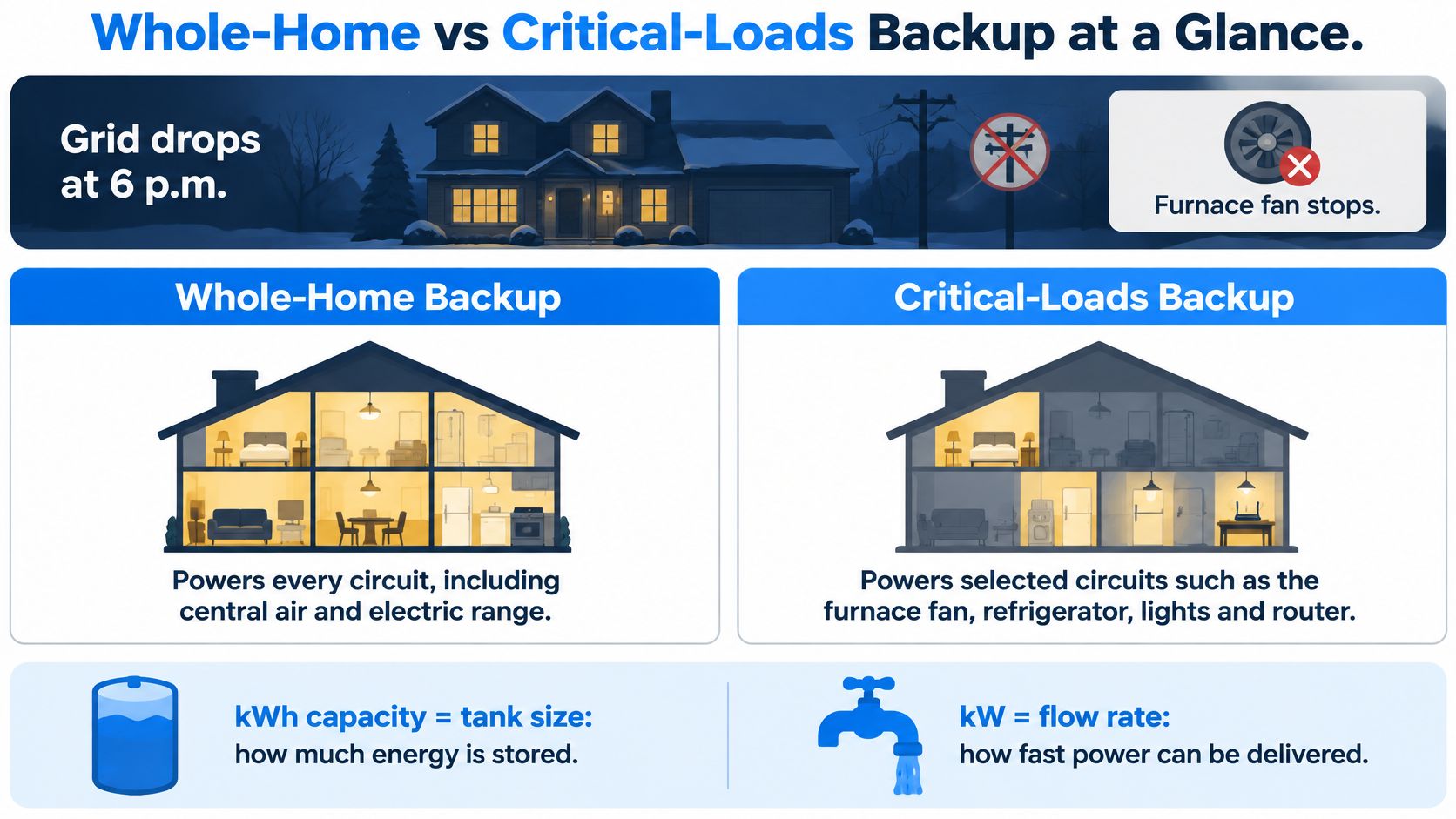
Choose the circuits before choosing capacity
The Lawrence Berkeley National Laboratory distributed solar and storage update found that the median residential battery installed in 2024 was 13.5 kWh, with most systems ranging from 10 to 20 kWh. That's a useful market reference, not a sizing recommendation for your particular home.
Backup system types by circuits and capacity
Setup | Circuits powered | Typical capacity | Best fit |
|---|---|---|---|
Critical loads only | Refrigerator, lighting, internet, selected medical devices, sump pump | Size to measured essential daily energy and desired outage duration | Households prioritizing essentials and a controlled budget |
Critical loads plus one heat pump or AC zone | Essential circuits plus selected heating or cooling equipment | Essential-load requirement plus the zone's outage energy allowance | Homes needing a conditioned living area |
Whole-home backup | Nearly every circuit, potentially including electric heat and water heating | Size from whole-home energy demand, simultaneous power, and recharge options | Households seeking broad coverage and accepting load controls or additional storage |
The capacity column deliberately uses sizing rules rather than universal ranges. A lightly used cooling zone and a heat pump working through freezing weather don't create the same battery requirement.
Start with critical loads, then add comfort loads deliberately. An all-electric home deserves a broader heating discussion, but it doesn't automatically need every circuit backed up. Likewise, prolonged outages may justify a recharge source rather than a larger battery alone.
Practical rule: Ask what must stay on before asking what can stay on.
A fuel-fired furnace illustrates why that distinction matters. Its blower and controls still need electricity, but backing them up is a different task from supplying electric resistance heat. Tell the installer how your home produces heat, not just that you want the heat working.
How Many kWh You Need and How Long It Lasts
Nameplate capacity isn't automatically the energy available to your appliances. The starting charge, manufacturer-defined usable capacity, inverter losses, temperature, and operating settings all affect the result. Don't subtract losses twice if an installer's estimate already expresses energy delivered to household loads.
Also clarify what “reserve” means. A backup reserve commonly protects energy from everyday bill-saving discharge so it remains available during an outage. A separate amount you intentionally preserve during an outage reduces what you can spend immediately.
The Habitelligence residential battery report describes how usable capacity, inverter output, reserve settings, weather, and household loads interact, and reports that 4 in 5 battery owners have never experienced an outage longer than their battery could cover. That experience doesn't establish how your home would perform through a prolonged winter outage.
Turn appliance demand into a runtime estimate
The calculation is straightforward:
Runtime in hours = energy available to loads in kWh ÷ average connected load in kW
The table below is a hypothetical calculation, not a list of measured appliance averages. Assume, solely for this example, that a nominal 13.5 kWh battery has 12 kWh available to household loads after the chosen operating allowances. Each row uses that energy independently, not with all the listed appliances connected.
Approximate runtime by load on a 13.5 kWh battery
Load | Typical draw | Approximate runtime | Notes |
|---|---|---|---|
LED lights, router and modem | Hypothetical combined average of 0.15 kW | 80 hours in this example | Measure the actual devices and switch off unnecessary lighting |
Refrigerator and freezer | Hypothetical combined average of 0.2 kW | 60 hours in this example | Cycling average determines energy use; startup demand still matters |
Sump pump | Measure running power and accumulated run time | Available kWh divided by average pump demand | Wet-weather operation can be much heavier than dry-weather operation |
Well pump | Hypothetical running draw of 1.5 kW | 8 hours of cumulative pumping | This isn't 8 hours of household water availability |
Heat pump | Hypothetical running draw of 2–3 kW | About 4–6 hours of operation | Auxiliary heat would change the calculation substantially |
Central AC | Hypothetical running draw of 3–4 kW | About 3–4 hours of operation | Other connected loads shorten this result |
Whole-house electric resistance heat | Hypothetical draw of 10 kW | About 1.2 hours of operation | A large heating load rapidly consumes stored energy |
For cycling equipment, distinguish hours running from hours elapsed. A pump that operates intermittently doesn't consume its running power continuously. Conversely, a sump pump measured during dry weather can badly understate storm demand.
Use a plug-in energy meter for compatible receptacle appliances. Have an electrician measure hardwired equipment and check starting demand. The home battery inverter guide explains why inverter capability belongs alongside energy capacity in the assessment.
Build an outage energy budget
List the circuits. Include controls and supporting equipment, not just the appliance you recognize.
Record operating demand. Nameplates help identify limits; measured consumption better captures cycling.
Estimate energy use. Multiply running kW by accumulated operating hours.
Choose the outage duration. Use the weather and household conditions you want the design to cover.
Allow for uncertainty. Include heavier pump use, colder weather, and battery aging.
Protect any remaining reserve. Add energy you want left afterward to the requirement. Don't subtract it from the capacity you need.
Say a household budgets, hypothetically, 2 kWh daily for refrigeration, 1 kWh for lights and internet, and 1 kWh for sump pumping. Its two-day requirement is 8 kWh before allowances. Choosing a hypothetical 20% planning margin raises that to 9.6 kWh; preserving another 2 kWh afterward means seeking 11.6 kWh available at the loads.
Those are scenario inputs, not appliance benchmarks. Replace them with measurements before purchasing equipment.
Often, removing a heating or cooling load extends endurance more effectively than adding another storage module. The useful comparison is the energy that appliance would consume over the outage, not its purchase price alone.
Pairing Backup With a Generator or Solar
Consider a Chester County household with a heat pump and a well pump that wants coverage through an extended outage. Its problem isn't just storing electricity. The household also needs a credible way to replenish energy while keeping large equipment operational.
A battery, solar array, and generator solve different parts of that problem. The battery supplies stored energy without combustion. Solar supplies new energy when conditions permit. A generator produces electricity while its fuel supply and mechanical condition allow.
Match the source to the outage
Backup source options compared
Setup | Runtime limit | Switchover | Best fit |
|---|---|---|---|
Battery only | Stored energy until the grid or another compatible charging source returns | Automatic on backup-capable systems; verify interruption tolerance | Short outages and quiet backup |
Battery plus solar | Stored energy plus weather-dependent solar recharge | Automatic when properly designed for islanded operation | Homes with suitable existing or planned solar |
Generator only | Fuel availability, equipment rating, and service requirements | Standby equipment starts and transfers after a delay | Extended outages with substantial loads |
Battery plus generator | Compatible charging controls, fuel supply, and equipment limits | Battery can bridge generator startup | Homes needing quiet intervals and prolonged coverage |
Solar panels alone don't guarantee outage power. The system needs equipment designed to isolate the home from the grid and coordinate production with household demand and battery charging. Existing solar equipment may need changes before it can operate during an outage.
Ask for an estimate based on the roof's shading, orientation, and winter conditions. Snow cover and overcast weather can reduce production just when heating demand is high. An annual production estimate isn't a promise of energy during a storm.
Check compatibility before combining equipment
With an approved battery-generator arrangement, the generator can supply household loads and recharge the battery. The battery can then support selected circuits while the generator is off, reducing noise during quiet hours. That operating strategy requires coordinated controls, not merely connecting both sources to the panel.
Generator input: Confirm that the inverter and control equipment expressly support the proposed generator connection.
Charging headroom: The generator must accommodate both household demand and the intended battery-charging load.
Fuel planning: Review delivery access, storage restrictions, and interruptions that could affect the chosen fuel.
Outdoor siting: Keep generator exhaust away from occupied spaces and openings, using the equipment's installation requirements and local approvals.
The whole-house gas generator guide can help you prepare the fuel and installation questions.
Never operate a combustion generator in a garage, even with the door open, and never energize house wiring through a receptacle. Proper transfer equipment prevents dangerous backfeeding.
Choose a recharge strategy for the weather you need to survive, not the weather you hope to get.
Use a battery alone when its stored energy covers your likely interruption. Add solar when site-specific production supports the outage budget, and consider a generator when dependable extended operation requires a fuel-backed source.
What a Battery Backup Installation Costs
The battery is only part of the installed project. Wiring, controls, panel modifications, equipment mounting, permits, and utility coordination can change the final quote substantially. Comparing equipment prices without comparing scope can make a complete proposal look more expensive than an incomplete one.
Treat the chart below as an illustrative breakdown, not a Pennsylvania price schedule. Your written proposal should establish the actual amounts and identify which items are already bundled into the installation.
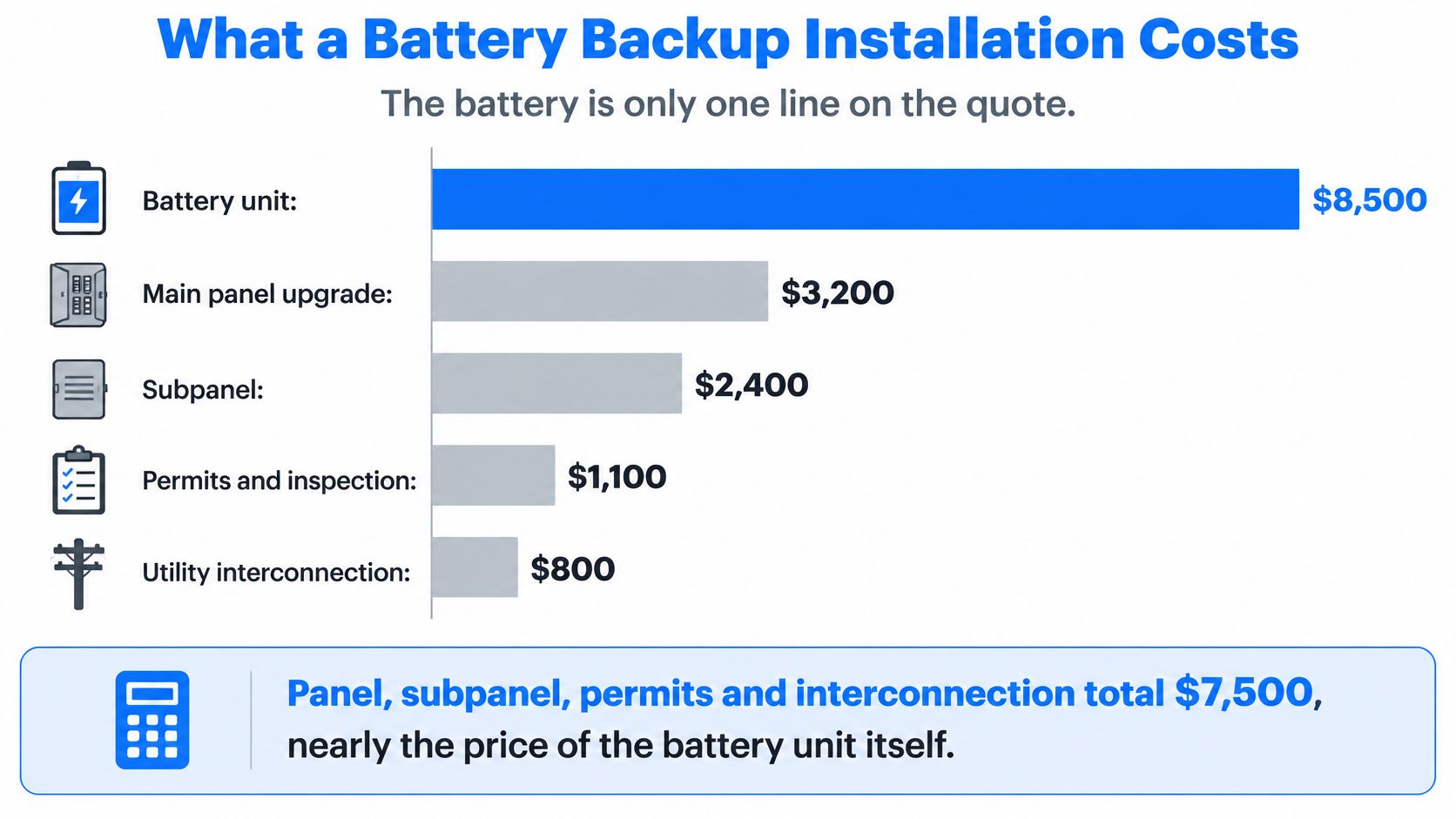
Request scope-based pricing
There isn't a substantiated local price range for each component in the available cost evidence. Use the following table to request project-specific pricing before incentives, rather than treating unsupported national ranges as a budget.
Typical cost items for a residential battery backup project
Cost item | Typical range | What drives it |
|---|---|---|
Battery and inverter | Written equipment-and-installation quote | Usable capacity, output, controls, mounting, and labor |
Critical-loads subpanel | Itemized circuit-transfer quote | Circuits moved, wiring distance, and existing wiring condition |
Main panel upgrade | Price separately after panel assessment | Equipment condition, bus rating, connection method, and service scope |
Generator transfer equipment | Itemized integration quote when included | Approved controls, generator compatibility, and wiring |
Permits and inspection | Local fees plus disclosed processing labor | Township or borough requirements and project scope |
Utility interconnection | Applicable utility charges plus disclosed application labor | Utility process, operating mode, and required modifications |
Additional battery modules | Separate expansion quote | Module count, mounting, wiring, and supported configuration |
A crowded panel deserves investigation, but a full panel doesn't automatically require a service upgrade. Available breaker positions are only part of the assessment. The electrician must evaluate the equipment ratings and permissible connection arrangement before recommending a replacement, subpanel, or other solution.
Ask whether an expansion quote includes only storage or also additional inverter output. More stored energy doesn't necessarily increase the power available to start heavy equipment.
Separate savings from protection
The Michigan demand-response statewide potential study modeled incentives of $500 to $5,000 toward a roughly $13,000 storage system while retaining outage backup. That illustrates how program participation can affect ownership economics; it isn't Pennsylvania pricing or an offer available to your household.
Bill savings come from the actual tariff, charging losses, solar-export arrangement, and eligible program payments. Backup value comes from maintaining refrigeration, water, communications, and other household functions. Keep these separate so a resilience purchase doesn't depend on an optimistic payback forecast.
Before signing, have the installer identify any proposed incentive by program name and eligibility requirements. Confirm current federal tax treatment with a qualified tax professional, and check state and utility programs rather than assuming a credit will apply.
Permits, Panel Capacity and Utility Approval
Approval involves several coordinated checks, not a single permit. The installer should establish the design's feasibility before ordering equipment that might require a different connection method or installation location.
The sequence below is a practical coordination framework. Local authorities and utilities may process some applications in parallel or require a different order.
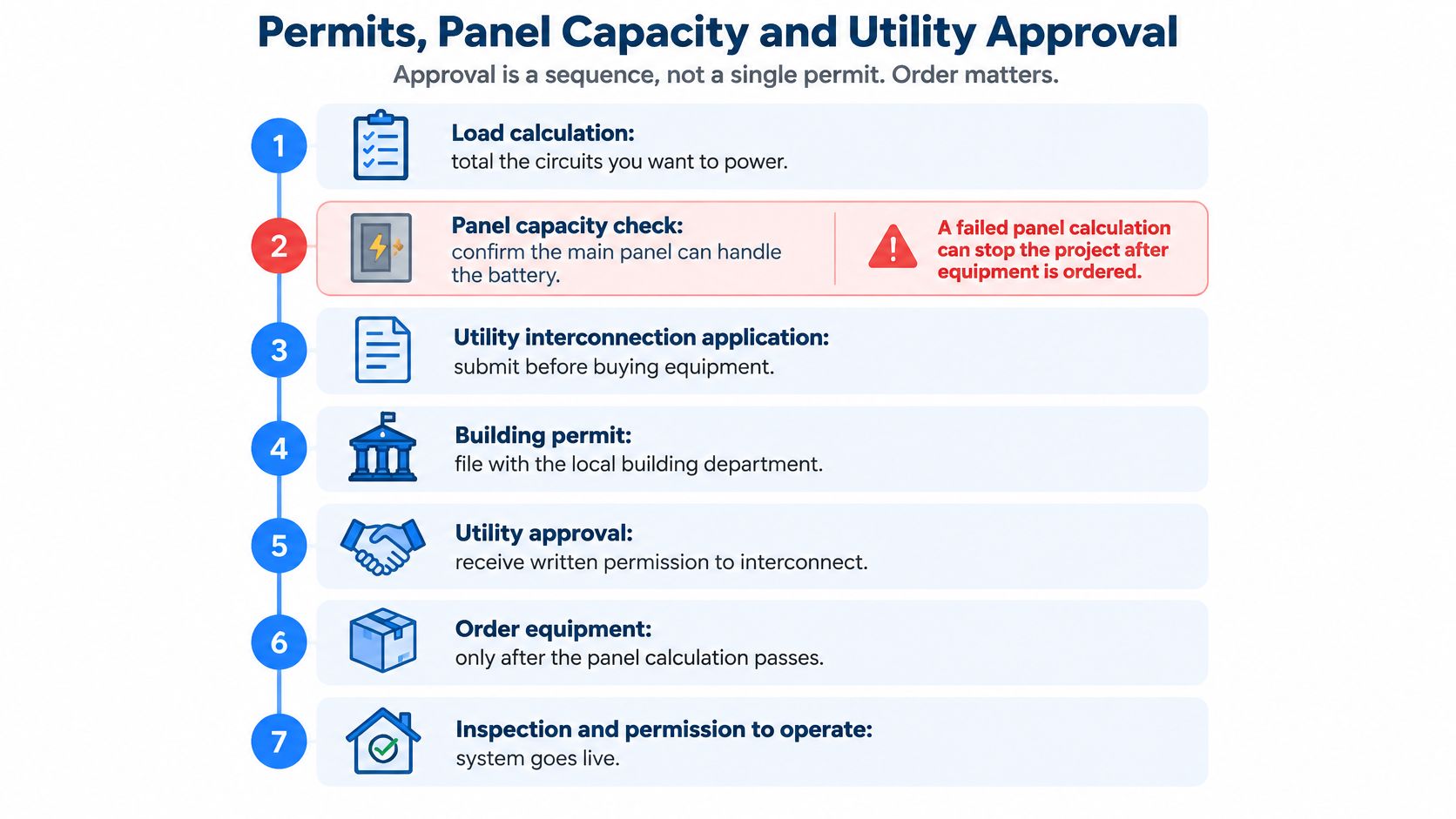
Establish the approval path before purchasing
Assess loads and the electrical connection. Have the electrician review service demand, panel ratings, backup loads, and the proposed battery connection. A load calculation alone doesn't establish every connection requirement.
Check the installation location. Review mounting support, vehicle exposure, moisture, temperature, access, and required separation from openings and other equipment.
Confirm local permits. Ask the township or borough which electrical and building approvals apply and who submits the documents.
Resolve fire-safety review. Where required, provide the equipment documentation and siting information before installation.
Coordinate with the serving utility. Confirm the interconnection process and whether the proposed export or non-export operating mode changes the application.
Complete inspection and authorization. Resolve corrections, obtain the required utility permission, and commission the system under the approved configuration.
Understand what the panel assessment must answer
The electrician should explain whether the constraint involves breaker space, equipment condition, connection ratings, or the service itself. Those are different problems with different remedies. The home electrical panel upgrade guide provides background for that conversation.
Ask which adopted electrical and fire-safety requirements govern the project. The installer should identify the applicable editions and local amendments rather than relying on a general statement that the installation meets code.
Get responsibility in writing. Your proposal should name who prepares drawings, files applications, schedules inspections, pays fees, and responds to corrections. It should also explain whether utility authorization is part of completion.
Ordering hardware before these questions are resolved can leave you paying for redesign or relocation. A clear approval path is as important as a clear equipment list.
Maintenance and Safety Over a Ten-Year Life
A battery's useful life depends on its equipment, settings, and operating conditions, so treat ten years as a planning horizon rather than a guaranteed warranty term. Read the warranty for its coverage length, retained-capacity terms, cycling or throughput limits, connectivity requirements, and exclusions.
Keep the purchase documents, commissioning report, service records, and screenshots of significant faults together. If backup performance changes, these records can help distinguish normal aging from a settings issue or equipment defect.
Use a manageable maintenance routine
Use this schedule as a starting point, then follow the service instructions for your specific equipment and site. A battery's upkeep is mostly observation and documentation; electrical inspection and repairs belong to a qualified technician.
Battery backup maintenance schedule
Task | Frequency | Why it matters |
|---|---|---|
Test outage and switchover | Quarterly, if supported by the approved test procedure | Confirms that selected circuits transfer correctly |
Check state of charge and app alerts | Monthly and before forecast severe weather | Helps identify faults and inadequate reserve |
Install firmware updates | As released through the approved process | Addresses software issues and control improvements |
Clear the clearance zone and vents | Monthly walk-through | Preserves required access and airflow |
Professional inspection of connections | Annually or at the manufacturer's service interval | Identifies connection deterioration and enclosure damage |
Check garage temperature | Seasonally and during unusual weather | Helps identify conditions outside the approved operating range |
A switchover test checks whether the chosen circuits receive power as intended. Follow the installer's documented procedure. Never pull a meter, open energized equipment, or improvise a grid-disconnection test.
For professional servicing, the technician should use the prescribed isolation procedure and inspect accessible wiring, mounting, protective devices, and the enclosure. Homeowners should leave covers closed and terminal work to qualified professionals.
Keep access clear: Store paint, cardboard, and household items away from the battery, its vents, and the space needed to reach it.
Know when to stop troubleshooting
Smoke, hissing, swelling, a strong burning odor, or rapidly increasing heat requires urgent action. Move people away and contact emergency services if there is evidence of fire or an immediate hazard. Do not approach the battery to operate controls or open its enclosure.
Contact the installer promptly about an unexplained alarm, repeated fault code, damaged enclosure, or unusual warmth that persists. Some warmth can occur during operation. Describe what changed, including when it began, rather than assuming every warm surface signals a failure.
Keep medical-device backup arrangements separate and clearly defined. If the household battery develops a fault, the person relying on powered medical equipment still needs an alternative power source or care plan.
Confirm Your Load List Before Calling an Installer
A household's backup plan can change with the season. A winter outage may make heating controls a priority, while a summer outage could put a sump pump or refrigeration first. Bring those differences to the site assessment so the installer can shape the design around how your home operates.
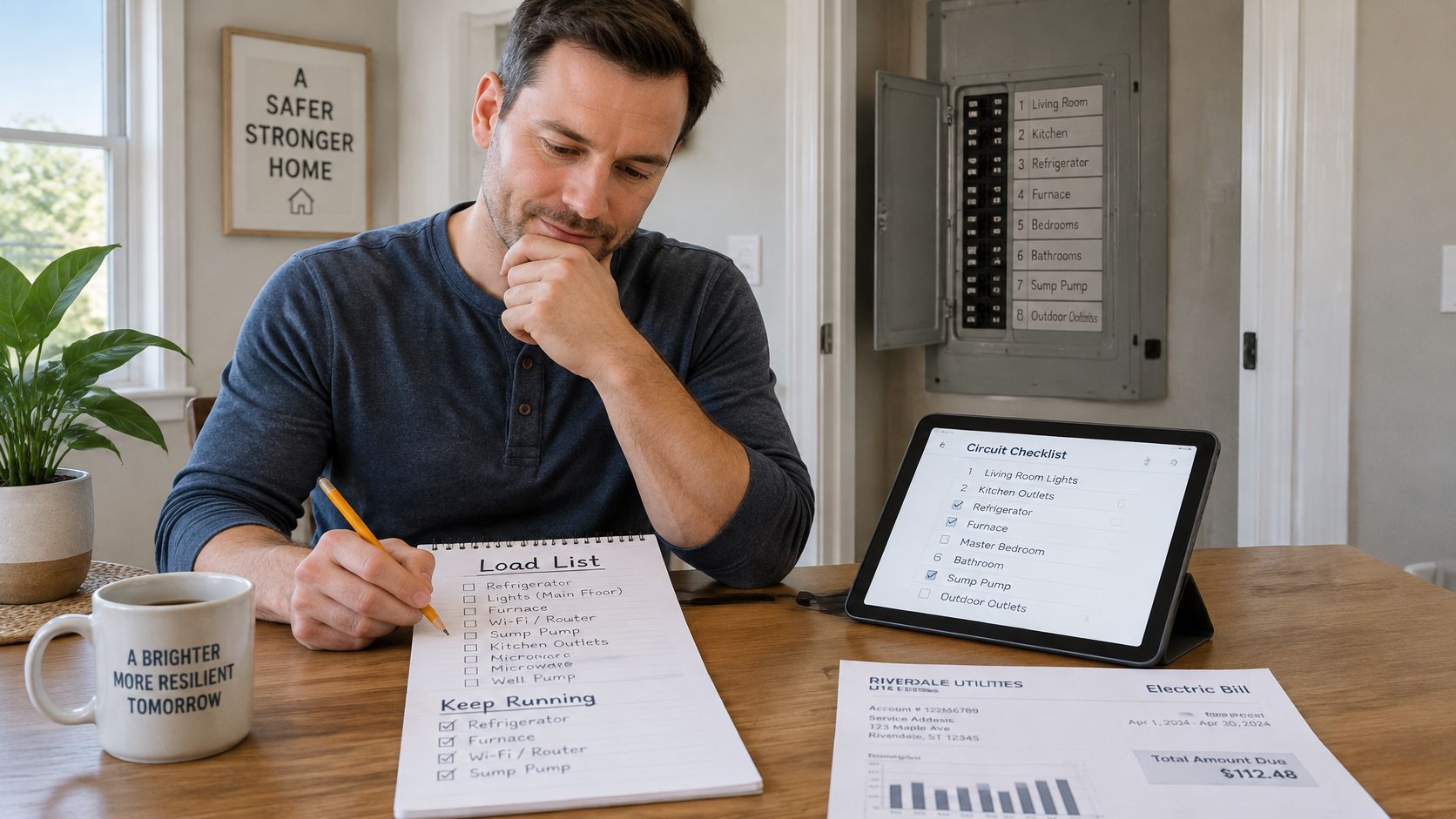
Prepare a household backup worksheet
Use this worksheet to give the installer practical context without trying to design the system yourself:
Gather utility consumption history. Bring bills from different seasons and interval-use records, if available. Whole-house usage gives context, though it does not show which circuits should receive backup.
Record past outage conditions. Note how long outages lasted, the weather, whether anyone was home, and what caused the most difficulty. A flooded basement calls for different planning than food spoilage.
Identify medical requirements. Record the equipment's electrical specifications, required continuity, and independent backup arrangements. Confirm acceptable interruptions with the equipment provider.
Photograph the electrical equipment safely. Capture the closed panel, its labels, nearby wall space, and service equipment. Leave covers on; an installer can inspect the wiring safely.
Set operating boundaries. Decide whether your household could postpone laundry, avoid using the electric range, or condition a smaller living area. A load plan only works if the household can follow it.
These details help the installer distinguish between loads that must run continuously and those that can be delayed. That distinction shapes the backup schedule: a battery's runtime depends on what draws power and when, not only on its capacity.
Ask for a demonstration, not just an estimate
Before accepting the design, request a circuit schedule and ask what happens when a large load starts. Find out which appliances are controlled automatically, which require manual action, and what the system does when the battery reaches its operating limit.
The handover should include a transfer test performed using the installer's supported procedure, access to system monitoring, alert settings, and written instructions for changing reserve settings. Make sure everyone who manages the household knows how to check system status and contact the installer for service.
A useful assessment ends with a clear operating plan. For example, the circuit schedule might show that refrigeration and the sump pump transfer automatically, while laundry must be postponed and another load switched off manually if the battery approaches its limit. This gives the household a practical way to manage backup power during an outage.
Amp'd Energy Solutions is a family-owned electrical contractor serving Southeastern Pennsylvania, with Tesla-certified installers for Powerwall systems and services covering battery backup, whole-house generators, and panel upgrades. Visit Amp'd Energy Solutions to request a site assessment, and bring your utility history and notes on past outages so the team can evaluate a practical backup design.
Comments